Lightweight, simple media player based on Quicktime
NicePlayer is a powerful, free software only available for Mac, being part of the category Audio & Video with subcategory Players.
Top Recommended Alternative
More about NicePlayer
It's available for users with the operating system Mac OS X and previous versions, and you can get it only in English. The current version of the software is 0.94.1 and it has been updated on 10/06/2006.
Since we added this software to our catalog in 2006, it has already reached 30,545 downloads, and last week it achieved 14 downloads.
About the download, NicePlayer is a relatively light program that doesn't need as much storage space than the average program in the category Audio & Video. It's a very popular software in countries such as Serbia, China, and Canada.
NicePlayer takes advantage of QuickTime and all of the codecs available to it, but without any of the nag screens. That means that you can play anything QuickTime can, and with our plug-in support even more -- including DVDs.
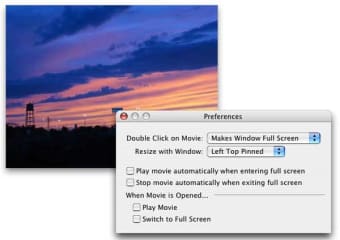
With an interface that only appears when you need it, NicePlayer makes it more convenient and easier to play all of your media. Double click on the window to change to full screen. Right click to pause. Use the scroll wheel to change the window size.
Because NicePlayer allows you to use the scroll wheel to adjust playback of your movie to arbitrary sizes, you can easily do your work while watching a movie. You can even adjust the size of the window when playing DVDs -- so when you come across one of those widescreen DVDs encoded in full frame, you can zoom in so that you don't get black bars on all four sides of the movie when watching on your Powerbook or Cinema Display (using NicePlayer's "Fit Width" command also simplfies this more in most cases).
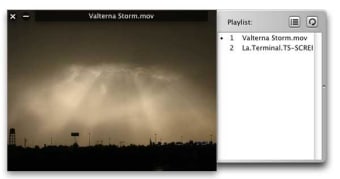
Use the playlist to queue up multiple media files and have them play sequentially, automatically.
QuickTime doesn't support playing the files you want to watch? NicePlayer has an open plugin architecture to support other media playback engines as well. That means that anyone can create a plugin to embed another media playback engine so NicePlayer can go be extended past QuickTime (i.e. DVD Playback, VLC).